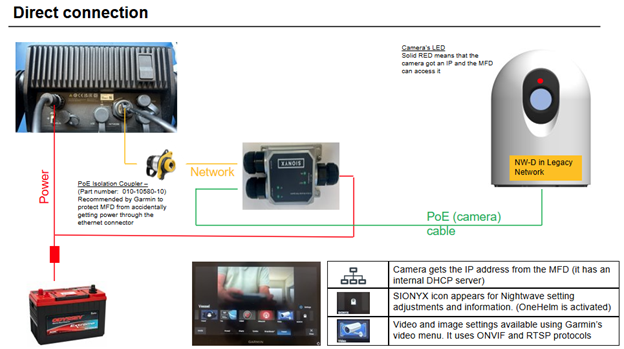
Garmin Legacy - Garmin MFD is the DHCP server on the network.
Garmin 8000 series MFDs and older require a Garmin PoE Isolation Coupler - Part number 010-10580-10
Plus one extra ethernet patch cable that is Straight, T-568B type (same color scheme on both ends) - please do not use Garmin Network cable as they are often cross-over. We do not supply either of these and they need to be purchased separately.
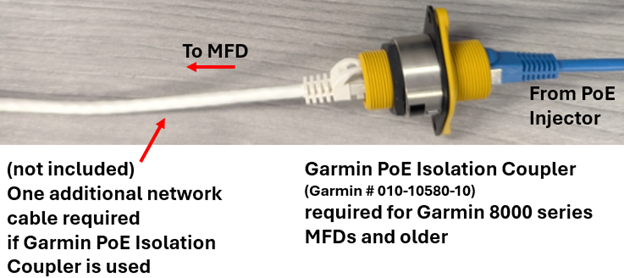
Garmin 9000 series do not need a PoE Isolation coupler. Garmin built PoE protection into these models.
It is always recommended to connect through a Garmin PoE Isolation Coupler and then into the back of the MFD. Please by-pass any switches / network expanders (GMS10, BlueNet 30) if you are able. See this Article if you have a blinking red LED light instead of a solid red: Blinking Red LED
Update Garmin software to have the ONVIF scan find the Nightwave as a Video Source.
Garmin Software version 40.02 added support for the SIONYX Nightwave Digital camera. If running on an older Garmin and you don't see the Nightwave listed in Video sources
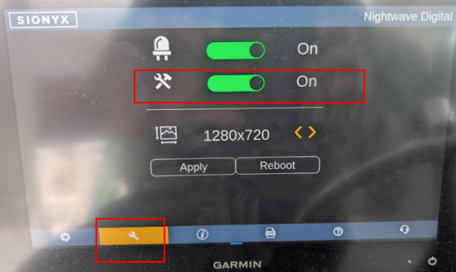
Access the SIONYX Tool Panel, Turn Compatibility mode on, reboot camera
Nightwave will show up as "GC200" in Video sources
In the SIONYX Tool-panel icon, change the resolution to be 1280 x 720, or 960 x 720. (1280 x 1024 might show a fuzzy video since the Garmin is interpolating the data to fit the aspect ratio of the MFD.)
On older Garmins, you may not see a Sionyx Tool Panel on your MFD screen. Access the Compatibility mode switch using the Sionyx mobile application.